








How 2K27 Auto Green Times Every Shot
Wide open on the wing, your defender a step late, and the release comes out a hair early. Brick. Rhythm Shooting in NBA 2K27 only drops if you green the Timing, so a perfect look still dies on a bad release.
That's the gap 2K27 auto green closes. This page explains the green window 2K describes, what Auto Green in Astrion's 2K27 Kiana does with it and what it risks with 2K's ban waves.
The 2K27 Green Window on Every Jumper
The 2K27 green window is the timing slot where a release counts as a green. In its Gameplay Courtside Report, 2K says the closer your Pro Stick flick gets to the perfect Tempo, the wider your Timing green window becomes.
Rush or drag the flick and the window shrinks. Shot Feedback then tells you whether the Timing was early or late and the Tempo too fast or slow, which is great for learning and brutal when one bad release costs you the game. 2K27 auto green takes that variable off your hands.
What 2K27 Auto Green Does on the Release
Auto Green sits in the Shot group on the 2K27 Kiana page. Where you'd normally nail the release by feel, NBA 2K27 auto green handles the timing for you, and the product page lists it at high accuracy.
It's a 2k27 shot timing cheat, plain and simple, and some players just call it a 2K27 auto greener. High accuracy isn't the same as every single shot, so the odd miss is part of the deal.
Online Adjust for 2K27 Auto Green in Live Games
Kiana lists Auto Green with online adjustment for a reason. Online Adjust lets you nudge the timing of 2K27 auto green anywhere from minus 0.10 to plus 0.10 for online games, instead of living with one fixed setting.
Start at zero and move it in small steps, checking Shot Feedback after each change until your releases stop drifting early or late.
Kiana is PC only. 2K27 auto green PC players get it through the Steam version, and if you searched 2k27 cheats pc, that's exactly what Kiana is built for: Windows 10 or 11, Intel or AMD, no BIOS setup.
2K27 Shooting Attributes and Badges Behind the Green
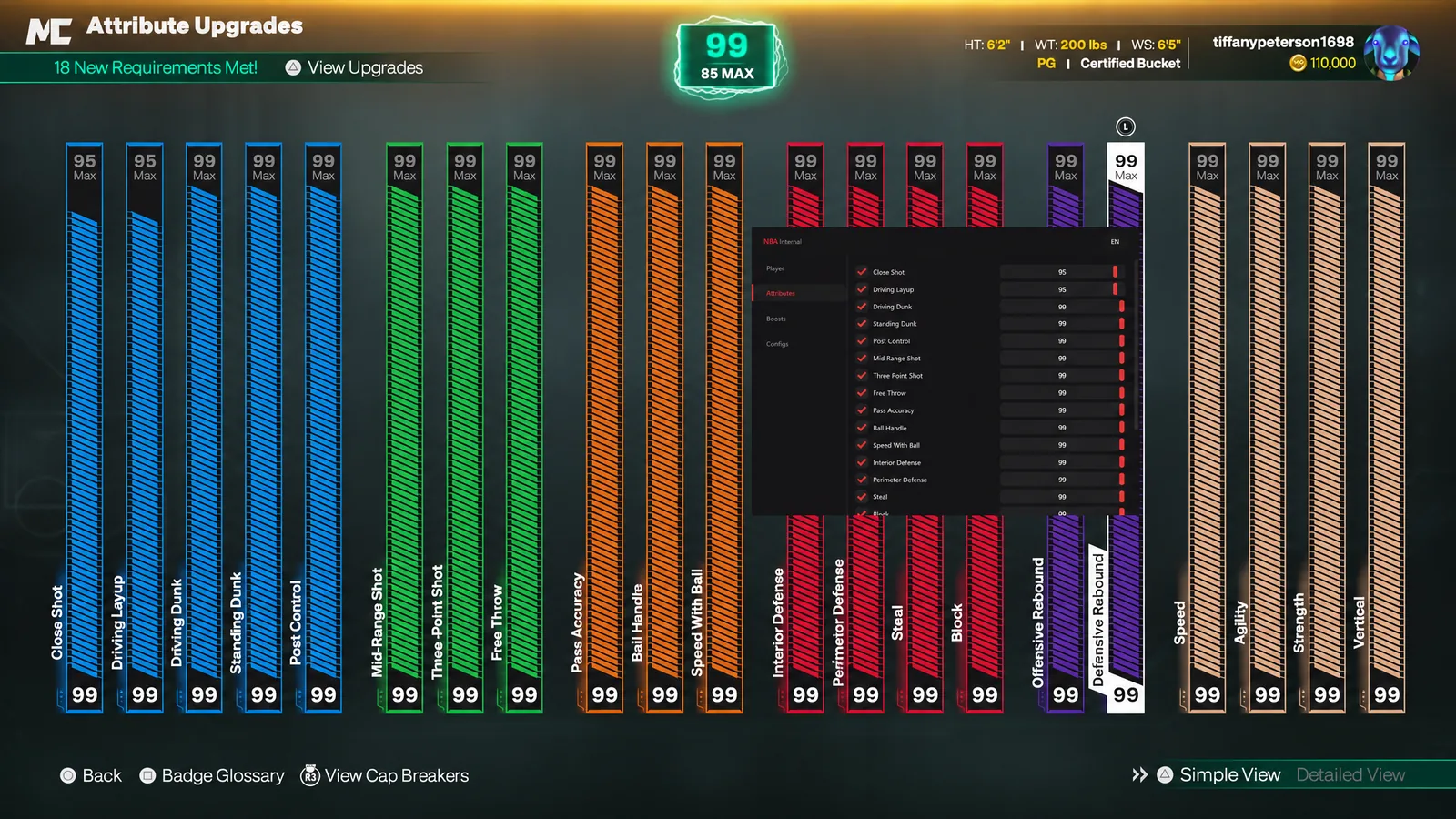
2K27 auto green handles timing, not ratings. The Attributes menu in Kiana sets Close Shot, Mid Range Shot, Three Point Shot and Free Throw directly, and the Badges menu unlocks all nine Shooting badges, so the build behind the release is as strong as you want it.
Boosts add Jump Shots skill boosts plus drinks like Gatorade Thirst Quencher, and five Takeover slots each take an ability and a perk. Worth knowing: 2K's v2.0 patch adjusted the timing windows on the Shot Artist and Calibrated Takeovers, so recheck your Takeover pick after updates.
2K27 Shot Timing and the Ban Wave
On 24 September 2K announced its first wave of permanent bans for cheats and scripts, shooting aids included, backdated to Early Access, with repeat offenders facing a console or PC ban. Steam lists Easy Anti-Cheat on NBA 2K27 at kernel level too. Any of our NBA 2K27 cheats can get an account banned.
A 2K27 auto green release from deep on every possession, on a build with maxed shooting, is exactly what gets you reported. Check the status page before you play, because undetected is today's status, not a promise.
Season 3 is expected on 27 November, so sort your settings before then. Keys are in the NBA 2K27 cheats category, and every menu is broken down on our NBA 2K27 hacks page.
2K27 Auto Green FAQ
Does Auto Green hit every single shot?
Kiana's page says high accuracy, not perfect. Expect the odd miss.
Can I use it on PS5 or Xbox?
No. 2K27 Kiana is a PC cheat for the Steam version. Console players chasing greens usually end up looking at Zen scripts, which our 2K27 Zen scripts page covers.
Can I save my Online Adjust setting?
Yes. Kiana's Configs let you create, load, save and delete setups, so your timing tweak loads with the rest of your build.