
-
Wardog - Disconnect
Undetected- Windows 10/11
- Intel/AMD
Wardogs Cheats
Aimbot, Player & Loot ESP
Choose Wardog - Disconnect at Astrion for adjustable aimbot, player ESP, loot filters and saved configs. Pick your licence duration and get instant delivery, backed by 24/7 support.
Get more control over who you aim at and what you see. Our Wardogs cheats category brings you Disconnect, with target filters, several player box styles and loot rarity controls in one menu. Set your aim key, choose the details you want on screen and save your preferences for your next session. You can check the current features and available durations on the product page before you buy.
Wardogs Hacks for
Aim & Awareness
A player box tells you where to look. A name, distance or weapon tells you more about the player you are looking at. Disconnect lets you choose those details individually, with 2D boxes, 3D boxes, corner boxes and skeleton ESP available. Keep the view as simple or as detailed as you want.
Separate visible and hidden colours help you read the overlay at a glance. Hide teammates when you only want opponents highlighted, then set the maximum display distance. You can also use off-screen arrows to show the direction of players outside your current view, with adjustable size, colour and radius.
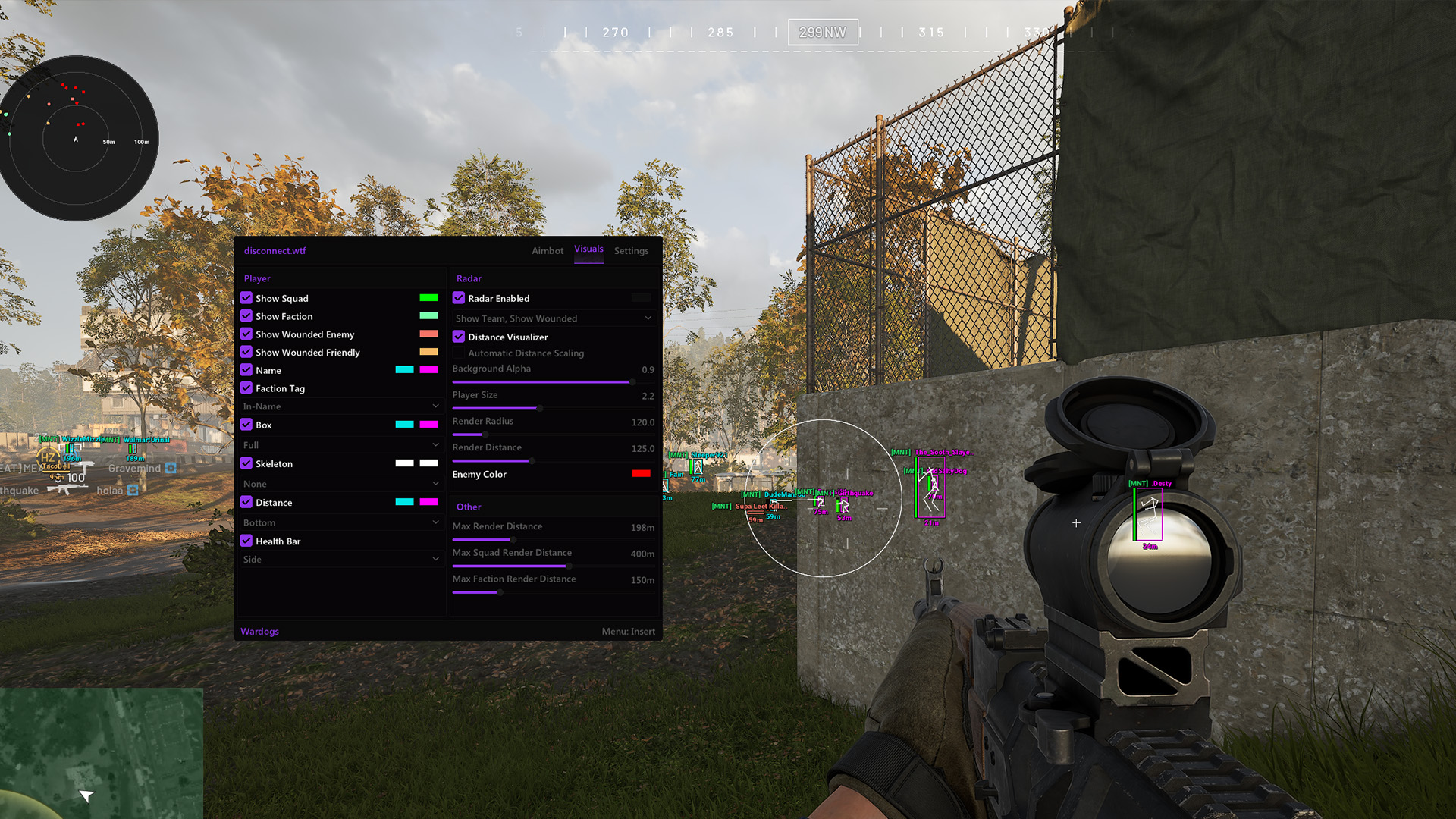
Your Wardogs aimbot has its own target selection, distance and visibility controls. Choose the target bone, set your FOV and adjust smoothing from the menu. Ignore-teammate and ignore-knocked filters give you more say over which targets it considers.
Those choices work alongside your visual preferences. Use loot rarity filters to cut down the items shown, then save your config once you have the menu where you want it. You can keep separate saved configs and return to a familiar selection without changing every option again.
Disconnect
Cheat Features
Choose your targets, adjust the overlay and keep the controls you use within reach.
Wardogs Aimbot
Choose how you activate the aimbot and which targets it considers. Disconnect includes keyboard and gamepad keybinds, target-bone selection, smoothing, maximum distance and a visible check. You can exclude teammates and knocked players, then adjust target selection to suit your preferences. The FOV circle has its own display toggle and colour. A target line and target crosshair are also available, so you can choose which aim indicators stay on screen. These are separate controls: changing the FOV does not mean you need to change every visual option.
Wardogs ESP & Player Details
Pick the player details you want to see, from a simple corner box to a skeleton with name, distance and weapon. Disconnect also includes rank and platform display options, box thickness, separate visible and hidden colours, and a spectators panel. If you are looking for Wardogs wallhacks, start with these player ESP features and review the menu shown here. Loot has a separate distance limit and rarity filters. That means you can reduce item clutter without turning off the player details you want to keep.
Target_Filters
Choose a target bone and maximum distance. Visible check, ignore-knocked and ignore-teammate options let you narrow the targets considered.
FOV_Controls
Adjust the aim FOV and choose whether its circle appears. Set the circle colour, target line and target crosshair separately.
Loot_ESP
Wardogs loot ESP includes a distance limit and rarity choices from Common to Special. Show the item rarities you want to find.
Offscreen_Arrows
Choose the colour, fill, outline, radius, length and width of the arrows pointing towards players outside your view.
Saved_Configs
Create, save and reset your preferences from the config menu. Use the config list to return to a saved selection.
Menu_Controls
Set menu and combat-mode binds. Adjust font size, VSync, FPS cap and automatic DPI scaling from the available menu options.
Your Controls, Explained
Aimbot, player ESP and loot ESP each have their own controls. Here is what you can change in the current feature set.
| Control | Available Adjustment | Does Not Replace |
|---|---|---|
| Aim selection | Target bone, filters and distance | Player ESP preferences |
| Aim FOV | Circle size, colour and display | Loot distance limit |
| Player ESP | Boxes, skeleton and player details | Loot rarity filters |
| Loot ESP | Item rarity and maximum distance | Aimbot target selection |
| Off-screen arrows | Direction markers with custom styling | On-screen player boxes |
| Saved configs | Create, save and reset preferences | Licence duration selection |
How to Buy & Download
Wardog - Disconnect
Choose your duration, check availability and follow the instructions supplied with your purchase.
Choose Your Duration
Open Wardog - Disconnect to check the available access periods and current price. Select the duration you want, review the product details and complete your order.
Get Instant Delivery
Astrion offers instant delivery for this product. Use the delivery details supplied with your order to access your purchase and its instructions. Keep your order information handy if you need help.
Follow Your Setup Instructions
Follow the instructions supplied for your purchase before launching the cheat. If you need help with access or setup, contact Astrion support. Once ready, choose your keybinds and save your preferences.
Choose What Matters
Before You Buy
Find the best Wardogs cheats for the way you want to play. Start with the features, then check your access period and support.
Features You Can Choose
You can change aim targeting, player ESP and loot filters separately. Keep a simple box view, add the details you need or save different configs for later. The product page gives you the full feature list, so you can check the controls that matter to you before ordering.
Access That Fits Your Plans
Choose from the one-day, three-day, seven-day and 30-day licence options shown on the product page. Check which durations are in stock, then select the access period that suits your plans. Review the checkout total before completing your order.
24/7 Support
Astrion offers support around the clock. Ask about product requirements before you order, or contact the team if you need help with your purchase. Include your order details and a clear description of where you are stuck so support has the information it needs.
Wardogs Cheats
FAQ
Get the details on targeting, ESP, licence durations and delivery before choosing your cheat.
-
Are undetected Wardogs cheats risk-free?
No. Astrion currently shows Wardog - Disconnect as undetected on the category page. That is a current status claim, not a guarantee against detection or an account ban.
Check the current product information before use. If the status or requirements are unclear, ask support before proceeding.
-
What can I change in the aimbot?
You can select a target bone, adjust smoothing and FOV, set a maximum distance and enable the visible check. There are also options to ignore teammates and knocked players.
Keyboard and gamepad keybinds are included. The FOV circle, target line and target crosshair have separate display controls, so you can choose the indicators you want to see.
-
How much does Disconnect cost?
The price depends on the licence duration you select. Available durations and stock can change, so check the current choices before you order.
Open the Disconnect product page, choose your duration and review the checkout total. Astrion offers instant delivery for this product.
-
Can I filter player ESP and loot separately?
Yes. Player ESP includes teammate filtering, maximum distance, box styles, skeletons and details such as name, distance and weapon. You can also change visible and hidden colours.
Loot ESP has its own maximum distance and rarity filters. You can reduce the number of items shown while keeping your preferred player details on screen.
-
Can I save my settings and get help with setup?
Yes. Disconnect includes create, save and reset config controls, plus a config list. If you need help with your purchase or setup, contact Astrion through Discord support.
Support is available 24/7. Keep your order details ready and describe the issue clearly, including any error message you see.
-
Where can I see Disconnect before buying?
The product page includes a menu screenshot and the current feature list. Use those to check the controls you want, then review the available licence durations.
You can also watch the demonstration in our Disconnect gameplay article. The recording shows the version used in that video; the current product details should guide your purchase.
Ready to Choose Disconnect?
Choose Disconnect for adjustable targeting, player and loot ESP, and configs you can save. Check the features, select your duration and order when you are ready. Want to hear from other Astrion customers first? Read their reviews, then choose your access period on the product page.
