








Rob Run Cheat Menu Walkthrough for Every Tab
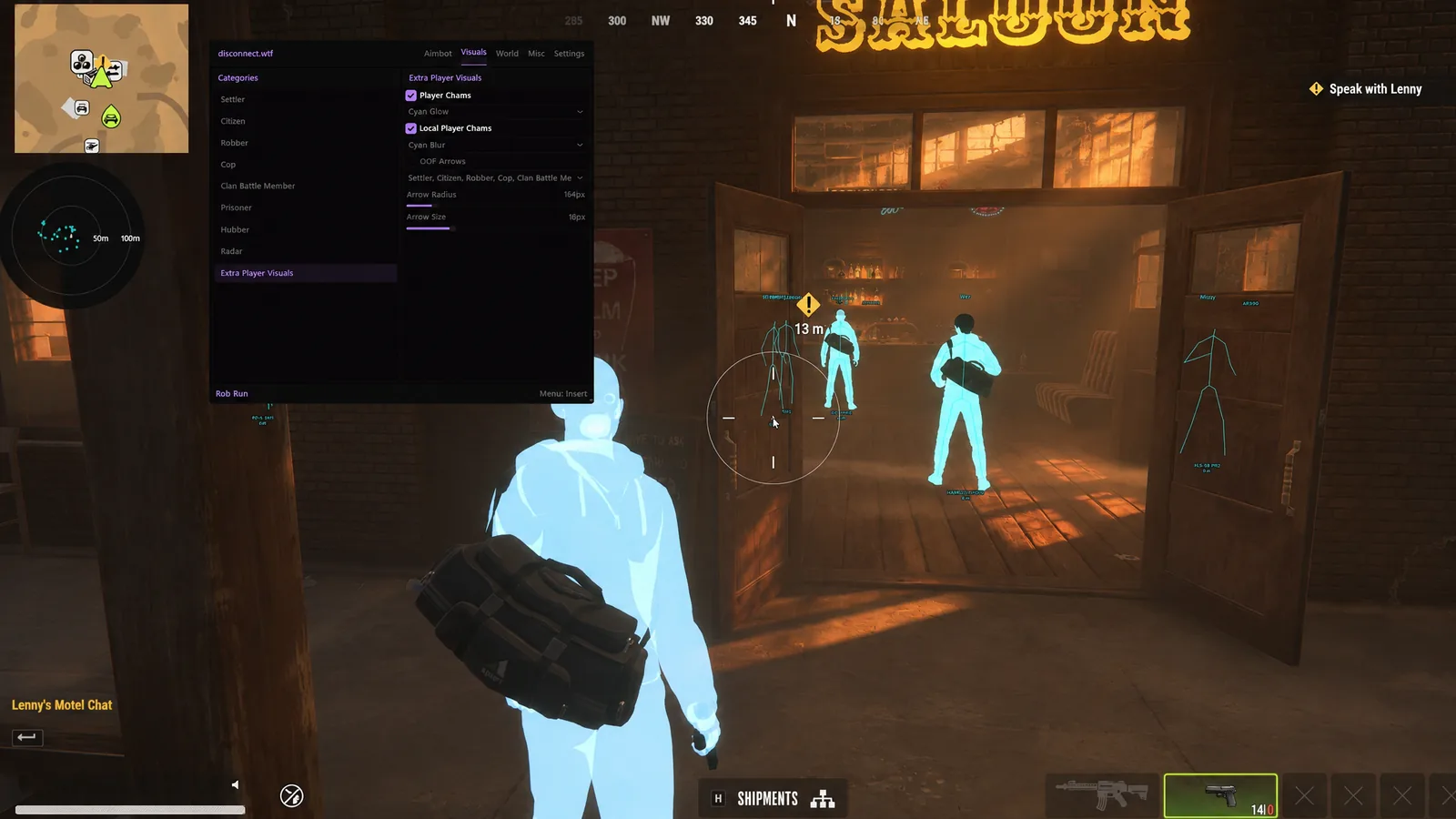
You've paid, your key has landed and the Rob Run cheat menu is open over Looty Bay with a wall of toggles staring back at you. Most players switch everything on, light up the whole city and then wonder why they can't spot a cop through the clutter.
This walkthrough goes through the Rob Run cheat menu in Rob Run Disconnect one group at a time, in the order Astrion's product page lists them, so you know what each tab does before you touch it.
Aimbot and Recoil Tabs in the Rob Run Cheat Menu
The aimbot group comes first in the Rob Run cheat menu. Normal Aim moves your crosshair onto a target with smoothing, humanization and a deadzone, while Silent Aim corrects the shot instead and has its own hit chance. You set the aim point, the radius, the FOV circle and which roles it's allowed to lock.
Weapon Modifications is the short tab next to it. Recoil Modifier and Spread Modifier each take an amount, so you choose how much kick and spread is left rather than killing them outright.
Rob Run ESP, Chams and Radar Tabs
Player Visuals is the heart of any Rob Run hack menu. Box or skeleton ESP, names, clan tags, held items and distance sit on every player, with indicators for reloading, armour, crouching, sprinting, knocked and in vehicle. Roles carry their own colours and settings, so cops and crooks read differently at a glance.
Chams sit in their own group of the Rob Run cheat menu, with materials like purple glow, cyan blur or red see through on players and on your own model. The radar group covers the minimap side, with role filters, teammates and off screen arrows for anyone outside your view.
Rob Run Loot, World and Camera ESP Tabs
Three Rob Run cheat menu tabs do the robbing work. Loot shows names, distance and value, with a minimum value filter plus category and rarity filters on top. World marks cargo, containers, ATMs, doors, hide spots, bodybags and vehicles, and the camera tab flags hacked or disabled cameras plus hacked alarms.
Keep these tight in the Rob Run menu. A long render distance on loot and world ESP buries players under icons, and each group has its own distance slider, so pull them in before a job.
Base and Workbench Tabs for Raid Nights in Rob Run
Base visuals across your Rob Run cheat menu show each base's owner, clan and status, then storage, cargo and garage contents and the defence timers. Workbenches and production get their own group, with status, contents and timers on workbenches plus markers for the laundering desk, grow tables and crypto farms.
Leave both off on a bank job. They're for picking a raid target, and a clean screen is far easier to read when a cruiser rolls up.
Misc Tab and Rob Run Keybinds
Misc holds the odds and ends, and it's the last Rob Run cheat menu group on the list. Battle Mode sits on a keybind of its own, next to an FOV changer, zoom with its own key and FOV, Instant Loot Search and freecam. The product page doesn't describe what Battle Mode changes, so test it on a quiet street first.
Those Rob Run keybinds, plus Custom Aim Keybind for the lock, are the ones the product page lists. Put the aim key on something you can hold mid fight and the zoom key well away from it.
Rob Run Cheat Setup Before the Menu Opens
Rob Run cheat setup is short on Astrion's side. Your key arrives straight after checkout with the access instructions, and the build needs Windows 10 or 11 on Intel or AMD with no USB, BIOS or Windows features to change. The Rob Run cheats download guide covers what that delivery looks like.
Looking for a Rob Run config to import? Disconnect's page lists no saved configs, so you build your own from the settings above. Skip the random Rob Run cheat tutorial videos too, since a different cheat's menu won't match ours.
New to it all? How to cheat in Rob Run walks a first session from key to raid. Grab keys from the Rob Run cheats category and check the status page before you load in. Every feature is listed on our Rob Run hacks page.
Rob Run Cheat Menu FAQ
Is the in-game menu laid out exactly like this?
We've followed the groups on the product page. The menu itself may order them differently, so read this as a map of what's in there rather than a screenshot.
Can I save a config in Rob Run Disconnect?
Saved configs aren't on the feature list, so we won't promise them. Ask in an Astrion Discord ticket if it matters to you.
Which tab should I set up first?
Player ESP and the radar. Get those readable before you add loot layers or turn the aimbot on.